
You depend on speakers in PCB systems to deliver clear and accurate sound. However, achieving good sound quality requires careful work on both electrical and acoustic components. Noise and interference can negatively impact performance, especially when digital signals and analog circuits are in close proximity. Common challenges include maintaining solid ground planes, strategically placing components, utilizing decoupling capacitors near DSP power pins, and minimizing the length of analog traces. These sound optimization methods help reduce distortion and ensure the speaker operates effectively. ZEH Audio possesses expert knowledge in customizing speakers and integrating them into PCBs, enhancing the overall performance of your audio system.
Challenge | Description |
|---|---|
Ground Planes | Solid ground planes help prevent ground loops and digital noise that degrade audio quality. |
Component Placement | Keep sensitive components away from high-frequency circuits to reduce EMI. |
Decoupling Capacitors | Position capacitors near DSP power pins to filter out high-frequency noise. |
Trace Lengths | Shortening analog traces and differential signals enhances noise resistance. |
Key Takeaways
Use solid ground planes to stop noise and make sound better in PCB systems. – Put sensitive parts far from digital circuits to lower interference. – Keep analog traces short to stop signal loss and make sound clearer. – Use decoupling capacitors near power pins to block unwanted high-frequency noise. – Try different speaker spots and room setups to get the best sound.
Sound optimization methods overview
It is important to know how speakers and PCB systems work together. This helps you get the best sound quality. The speaker drive circuit connects your audio signal to the speaker. Matching the speaker and PCB design lowers noise and distortion. This makes your system give clear and accurate audio. ZEH Audio customizes speakers and puts them into PCB systems. Their skills help you get great performance by fixing electrical and acoustic problems.
The best sound optimization methods for speakers in PCB systems focus on both electrical and acoustic parts. You can use these methods to make sound clearer and cut down interference:
Use Finite Element Analysis (FEA) to check vibrations and acoustic behavior. This helps you design speakers that sound good and have less noise.
Use simulation-driven design tools like OptiStruct to balance electrical and acoustic factors. These tools help you get the best sound quality.
Do Modal Frequency Analysis on the speaker assembly. This lets you see how the speaker works with its environment and improve its performance.
Common sound issues
You may face several sound quality problems in PCB-based speaker systems. Signal loss happens when trace widths are too narrow. This raises resistance and causes muffled sound or loss of high frequencies. Impedance mismatches can cause signal reflections, which create distortion. If power delivery is weak because traces are narrow, you may see voltage drops. These drops cause distortion during loud audio peaks. Fixing these problems with sound optimization methods keeps your system reliable and sounding good.
Sources of noise
Noise can get into your PCB system from many places. You need to find and lower these to keep sound quality high. The table below shows the main types of noise you may find:
Type of Noise | Description |
|---|---|
White Noise | Noise spread evenly across the frequency spectrum. You can lower it by limiting bandwidth. |
Pink Noise | Noise that is stronger at low frequencies. It is hard to remove at the PCB level. |
Johnson Noise | Thermal noise caused by temperature. You cannot stop it, but you can lower it by cooling. |
You should use sound optimization methods to fix these noise sources. ZEH Audio is good at PCB design and acoustic analysis. They help you find and lower these problems. Their solutions make sure your speakers give the best sound in any place.
Circuit and PCB layout techniques
Component placement
You can make sound better by putting parts in smart places. Put all analog parts together. Keep them away from digital circuits. This helps stop noise from digital signals from getting into your audio path. Put important parts, like amplifiers and audio processors, far from power transformers and high-current traces. Use wide traces for power and ground. This lowers resistance and inductance. Make sure important signal paths are short. This helps cut down electromagnetic interference (EMI). ZEH Audio uses these ideas to make PCBs that give clean sound.
Tip: Put all ground connections at one main point. This stops ground loops and keeps your audio signal clean.
Power and grounding
Good power and grounding design is very important for sound optimization methods. Use star grounding to connect all ground paths to one main spot. This stops ground loops and lowers noise. Keep analog and digital grounds apart on the same ground plane. Join them at one point. This helps stop noise from moving between sections. Put decoupling capacitors close to IC power pins. Use short ground connections. This blocks high-frequency noise and keeps power steady.
Here is a comparison of grounding techniques:
Criteria | Star Ground | Ground Plane |
|---|---|---|
Impedance at High Frequencies | High | Very Low |
EMI Performance | Poor | Excellent |
Suitability for Mixed-Signal | Limited | Highly Suitable |
Ease of Implementation | Complex | Simple |
ZEH Audio’s engineers use solid ground planes in multilayer PCBs. This lowers EMI and keeps your audio signals clear.
Signal routing
Careful signal routing helps you avoid interference. Keep analog and digital signals on different layers. Run audio traces away from power supply lines and high-current paths. Cross signal and power lines at a right angle. This helps lower interference. Use copper pour and ground planes around important interconnects for better EMI isolation. Short analog traces help stop signal loss and parasitic inductance. ZEH Audio uses these routing ideas to make sure your speaker system works its best.
Note: Put decoupling capacitors near power pins of active parts. This easy step can really lower noise in your system.
By using these circuit and PCB layout techniques, you can get better sound and less noise in your speaker systems. ZEH Audio’s skills in PCB integration and speaker customization help you get the best results from your sound optimization methods.
Acoustic and system optimization
Speaker placement strategies
You can make sound better by moving speakers around. Try putting speakers in different places to find the best sound. The room’s size and shape change how sound works. Rooms shaped like rectangles with different wall lengths are good for clear audio. Put soft things like couches or panels in the room. These help stop echoes and make sound clearer. ZEH Audio uses these ideas to set up speakers for each place.
Move speakers to new spots and listen for balance.
Pick rooms that do not have walls with the same length.
Add soft stuff to the room to soak up extra sound.
Acoustic analysis tools
You need special tools to check how speakers work. Use measurement-grade condenser microphones for good sound checks. Pre-polarized ICP® microphones give you strong test results. Phantom-powered microphones work in many places and help you test sound in different spots. Specialty microphones are made for special tests. ZEH Audio uses these tools to make speaker systems work their best.
Microphone Type | Description |
|---|---|
Measurement Grade Condenser | Needed for careful sound checks in many places. |
Pre-polarized ICP® Microphones | Used for strong sound tests, giving good data. |
Phantom Powered Microphones | Work in different power setups for many uses. |
Specialty Microphones | Made for special tests, helping in unique cases. |
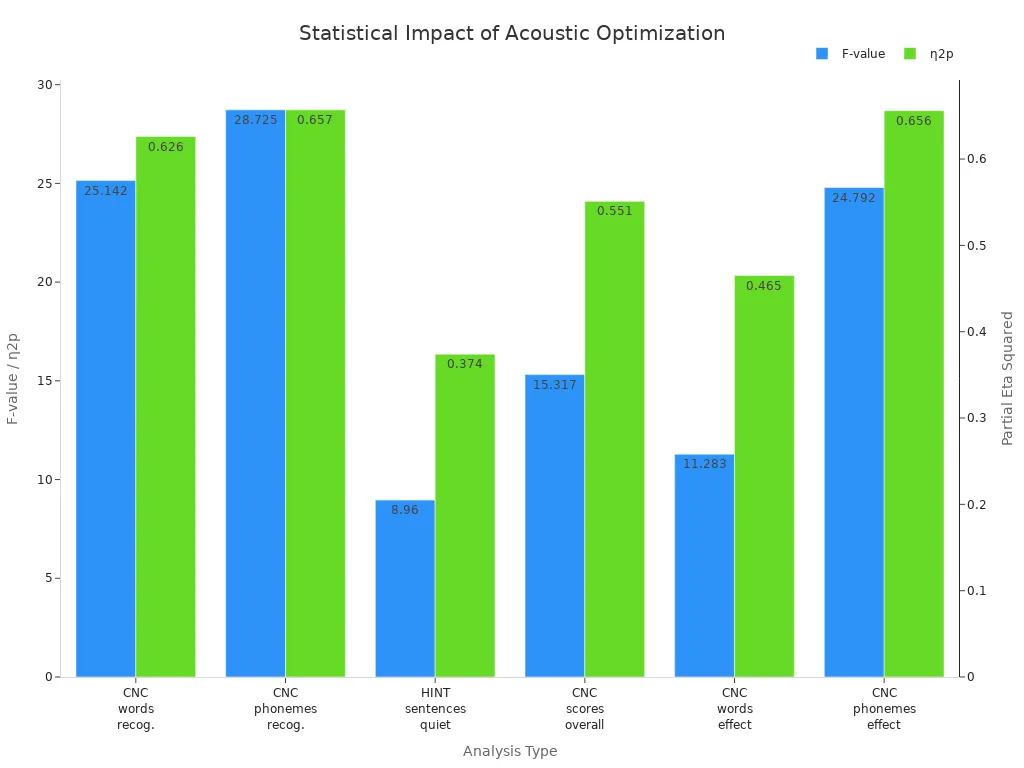
The chart below shows how acoustic optimization changes speaker performance in PCB systems. It shows big effects on how speakers work.
Gain structure and equalization
Good gain structure and equalization settings help you get the best sound. Set input gain high enough so the signal stays strong and clear. Change the equalizer after the microphone preamp and before the analog-to-digital converter. This makes it easier to control signal levels and headroom. If you use the equalizer well, you make the signal-to-noise ratio better. ZEH Audio’s engineers also fix crossover settings and build speaker boxes to boost low sounds and stop resonance. They pick diaphragm and voice coil materials to make speakers more sensitive and sound better.
Tip: Use sound optimization methods like careful gain staging and box design to lower distortion and make sound clearer.
If you follow these steps, you can get clear and accurate sound in any PCB system.
Managing interference and crosstalk
Interference and crosstalk can make your speaker sound bad. You need to use smart design steps to keep your audio clear. ZEH Audio’s engineers use special ways to help you fix these problems and get the best sound.
Analog/digital separation
You can lower interference by keeping analog and digital parts apart. Put analog parts in one spot and digital parts in another. This stops digital noise from getting into your audio signals. Always run your signals over a solid ground area. Do not split ground planes unless you need galvanic isolation. Use a ground plane under signal and power layers for strong EMI shielding.
You should also:
Split your board into analog and digital zones when placing parts.
Put voltage references for ADC and DAC chips close to their pins and add filters.
Ground ADC and DAC parts with one ground net.
Use guard traces, which are wide ground lines next to analog signals, to catch stray fields and send noise to ground.
Connect guard traces often to the analog ground plane with stitched vias.
Cover sensitive parts with Faraday cages or guard rings if you need extra protection.
Tip: Keep traces far apart and do not run them over split ground planes. This helps stop crosstalk and keeps your signals clean.
Filtering techniques
Filtering helps block noise and interference. Put decoupling and bypass capacitors close to IC power pins. These parts keep power steady and send high-frequency noise to ground. Use ferrites and common-mode chokes on power and signal lines to soak up high-frequency noise and help with impedance control. EMI filters, which use capacitors and inductors, block bad frequencies on power inputs or ports.
You can also:
Make trace spacing bigger to cut down electromagnetic interference.
Use differential signaling to cancel out common-mode noise.
Keep traces short and run them at right angles to lower overlapping electromagnetic fields.
ZEH Audio uses these filtering steps to make sure your speaker system gives clear and accurate sound with little interference.
You can make speakers work better in PCB systems by using good grounding. Place parts in smart spots and route signals carefully. Try using simulation software first and test your designs in real life. Get all your parts and tools ready before you build. Use wide power traces and leave space between parts for easy soldering. Write down what you do for each prototype and talk to skilled engineers. These steps help your speakers last a long time. ZEH Audio can help with speaker customization and PCB integration. Contact them for special sound optimization and tuning help.
FAQ
What is the most important step for reducing noise in PCB speaker systems?
You need to use solid ground planes and put parts in smart places. These steps help stop interference and make sound better. ZEH Audio uses special PCB designs to help you get great results.
How do you test speaker performance after PCB integration?
You can use measurement microphones and special tools for sound checks. These tools let you see how the speaker sounds and if there is distortion. ZEH Audio’s engineers use these ways to make your system sound clear.
Why does analog/digital separation matter in PCB audio design?
You keep analog and digital parts apart to stop noise and crosstalk. This helps protect your audio signals. ZEH Audio’s team uses this idea to make sure sound is clean and correct.
Can you improve sound quality with only software adjustments?
You can use equalization and gain settings to help sound. But changing hardware gives even bigger improvements. ZEH Audio uses both ways to get the best sound.
What makes ZEH Audio different in speaker and PCB integration?
ZEH Audio gives custom speaker choices, expert PCB layouts, and special tuning for sound. You get a system made for you and tested to work its best.